
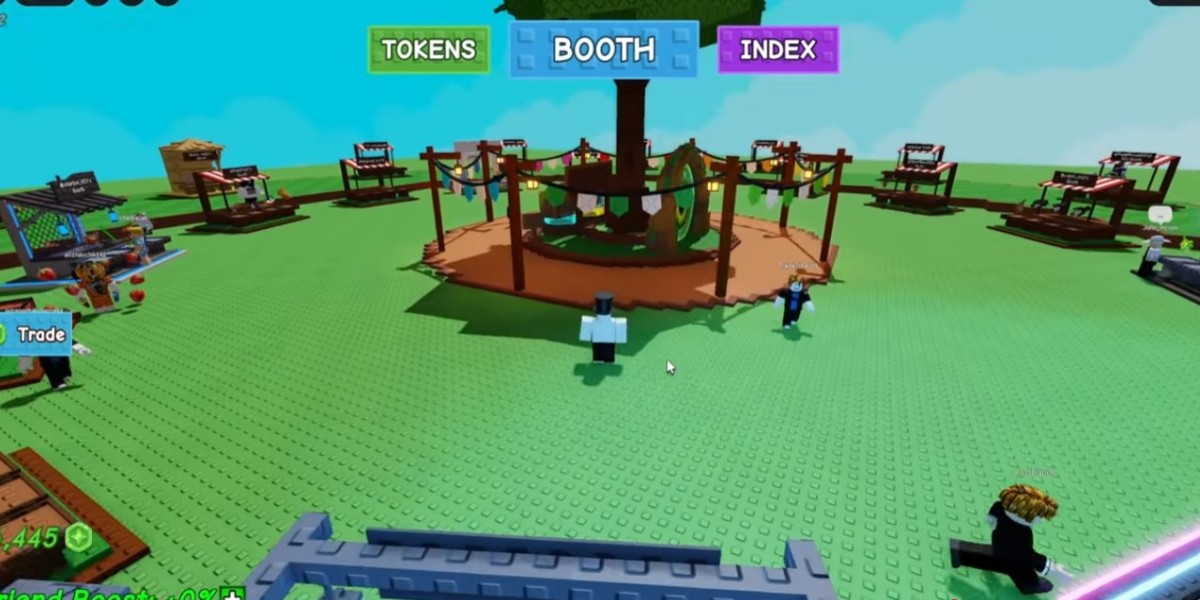
The latest update in Grow a Garden has brought a wave of excitement to the player community. As someone who’s been actively trading and exploring the game for months, I couldn’t resist diving straight into the new trading hub and testing how these changes affect both seasoned and casual players. After spending several hours exploring, trading, and observing other players, here’s a detailed rundown of what you can expect and some practical tips to make the most of it.
A First Look at the Trading Hub
The new update introduces a dedicated trading area where players can buy, sell, and display their pets. Upon entering, I was immediately struck by the sheer number of players present. Unlike previous updates, the server felt lively and bustling, which adds a sense of energy and urgency to trading. The hub itself is visually appealing, with clearly organized booths for different types of pets and items. Walking through the area, I noticed that while most players are experimenting with trading for the first time, some veterans are already setting up their booths strategically to attract buyers.
One tip I learned quickly is to use a small sign or banner to display which pets you’re selling. This not only makes your booth stand out but also helps curious players identify what you have at a glance. For example, holding a popular pet like a Ruby Squip or Dragonfly visibly signals availability without having to manually click on each item. From my experience, visibility significantly increases the chances of a sale in a crowded server.
How to Strategically Price Your Pets
Pricing is where things get interesting. In the early hours after the update, I noticed a lot of price confusion. Some players were listing pets at extreme prices, probably due to not knowing the current market value yet. As someone who has traded frequently, I found that setting moderate prices—slightly below what others ask—can attract more buyers. For example, I sold a Butterfly pet for 30 coins, which seemed inexpensive, yet it sold almost instantly. Over the course of a couple of hours, I earned around 149 tokens by adjusting prices strategically and monitoring nearby booths.
It’s also worth noting that certain pets can’t be traded immediately after acquisition. For instance, newly hatched pets or some special event items are temporarily locked from the market. Keeping track of these restrictions is crucial to avoid frustration when setting up your booth.
Making the Most of Tokens
The update also introduced a new currency system called tokens, which is parallel to Robux. Tokens are used in trading and for special in-game purchases, and they can be earned through both selling pets and opening new item packs. I experimented with buying packs using tokens and was pleasantly surprised by the variety of pets available, though luck still plays a role.
For players who want to get ahead quickly, using tokens wisely is key. Don’t rush to spend them all at once. Instead, observe the market for pets that are in high demand but reasonably priced, then strategically purchase or trade. Personally, I found that patience pays off, as waiting a few minutes or even an hour could reveal a better deal than buying impulsively.
Collecting and Displaying Pets
One of the enjoyable aspects of this update is how pets are showcased. Each booth allows players to present pets creatively, which adds an extra layer of strategy. Popular pets like large or rare species often draw a crowd, giving sellers the opportunity to negotiate or adjust prices on the spot. During my session, I noticed that having at least one visually appealing pet—regardless of its rarity—can significantly increase foot traffic to your booth. It’s a mix of marketing and gameplay rolled into one.
If you’re someone who enjoys growing and customizing your garden, this trading system complements the in-game experience perfectly. You can sell off duplicates, trade for pets you don’t have, or even collaborate with friends to create unique booths that attract buyers.
Tips for New Traders
For players who are new to the game, I recommend the following approach:
Start Small: Begin by selling pets you can afford to lose or are less rare. This allows you to learn the trading mechanics without pressure.
Monitor Prices: Spend time observing other booths to understand the average market value. Prices are dynamic in these early stages of the update.
Interact with Players: Friendly negotiation can go a long way. Many players are willing to adjust prices if you approach them courteously.
Consider Using External Platforms: Some players use platforms like U4GM to check current trading trends or purchase items safely. While I prefer in-game trading for authenticity, external resources can provide additional market insight.
Additionally, if you’re a collector or aiming to expand your garden without spending too much, it’s worth noting that the update encourages creative ways to maximize pet utility. For instance, trading common pets in bulk or combining token purchases with careful timing can help you obtain the pets you really want.
Budget-Friendly Tips
For players concerned about costs, focusing on the cheapest grow a garden items can help you maintain a steady progression without overspending. Small purchases or less rare pets often have surprisingly high value when used strategically for trading. I personally recommend checking multiple booths before buying, as some players underprice items simply to attract attention, giving savvy traders an opportunity to profit.
This approach not only saves resources but also builds a sustainable way to expand your pet collection while keeping the game fun and rewarding.
Overall, the latest update in Grow a Garden successfully adds depth and excitement to the trading experience. From bustling servers to token-based purchases and visually engaging booths, there’s plenty for both casual players and hardcore traders to enjoy. The key takeaways are to monitor the market, price wisely, and use the new token system strategically. Whether you’re aiming to expand your garden, complete a collection, or just enjoy the trading interactions, this update makes the game feel fresh and dynamic.
Fan Guide: Grow a Garden Pets Discord: U4GM Guide